Group structure report
The Group structure report shows the allocation of shares held by participation, shareholders, and partners in the group.
To access the Group Structure report page, click  Group > Group Structure > Group Structure report tab.
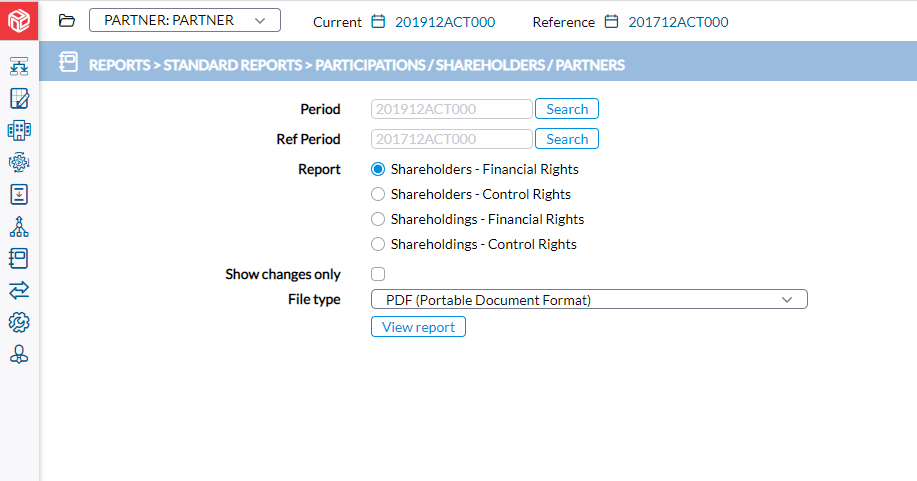
Report types
The following report types are available on this page:
| Report type | Description |
|---|---|
|
Shareholders - Financial Rights |
Shows the direct shareholders of the companies in terms of financial rights. |
|
Shareholders - Control Rights |
Shows the direct shareholders of the companies in terms of control rights. |
|
Shareholdings - Financial Rights |
Shows a company’s shareholdings in other companies in terms of financial rights. |
|
Shareholdings - Control Rights |
Shows a company’s shareholdings in other companies in terms of control rights. |
Generate a shareholding report
-
Enter the required information in these fields:
-
Period — Select the consolidation period for the report.
-
Reference period — Select the consolidation period to use as a reference for comparison.
-
Report — Select a report type.
-
Show changes only — Optionally, select this option to display only changes in shareholder or shareholding rights on the report.
-
In the File type field, select the output format.
-
-
Click
 to produce the report. After the report is generated, a download link appears below for you to click and view it in the file format selected.
 See also