Release Notes
2025.4.0
November 2025
Release notes describe the enhancements and bug fixes contained in new releases and maintenance releases for Prophix Cloud deployment only.
Tip: To find the release note that contains a specific issue, search on the Prophix Support Desk ticket number.
What’s new
Enhanced feedback experience
This release introduces an improved way for clients to share product feedback directly within the application. The Product Feedback link in the  Help menu has been updated to direct users to the new Pendo feedback forum.
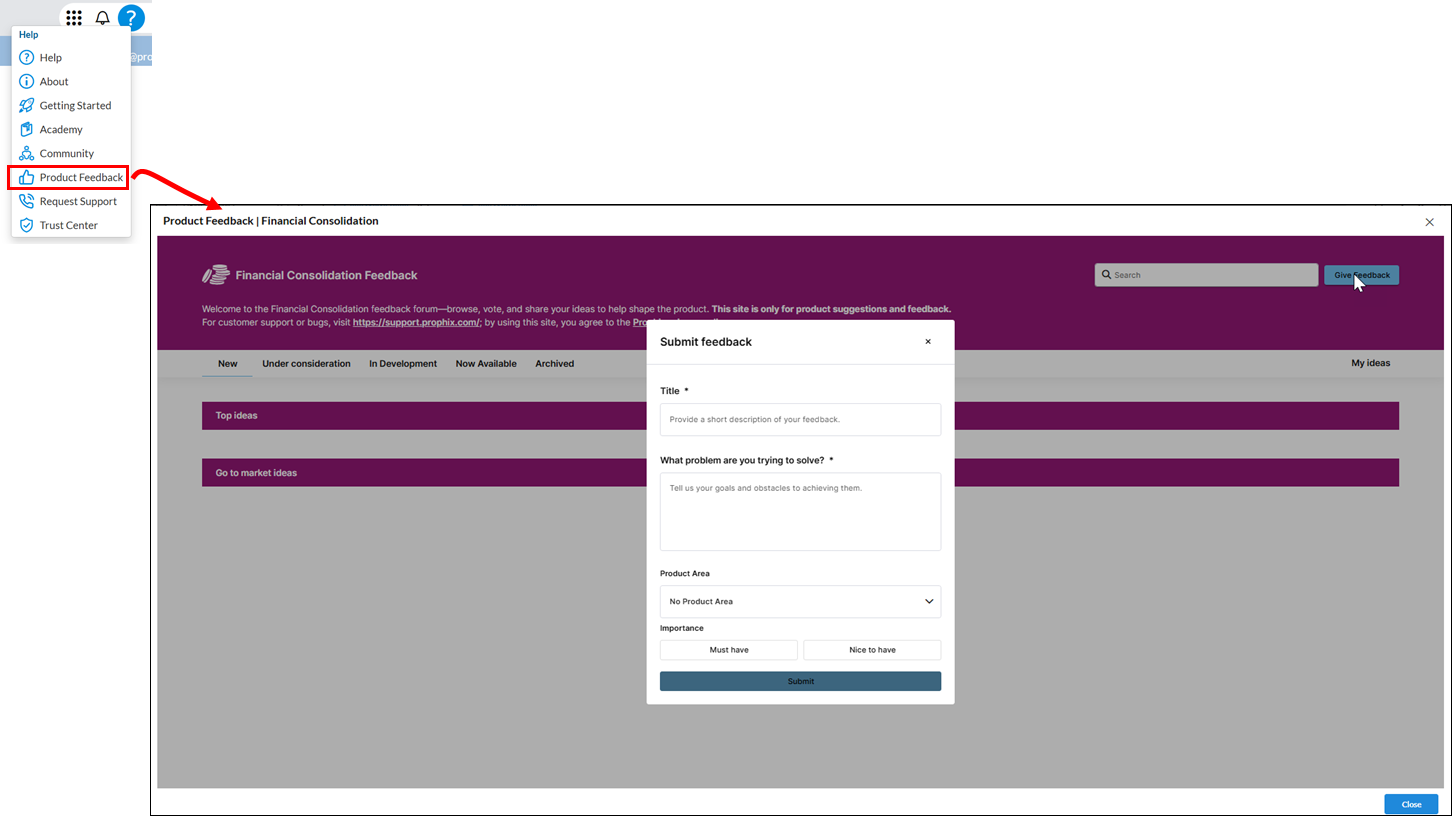
Clients can now submit ideas and feedback without leaving the Prophix platform, no separate login required. Access is instant, with no wait times or manual approvals.
Access to the Trust center
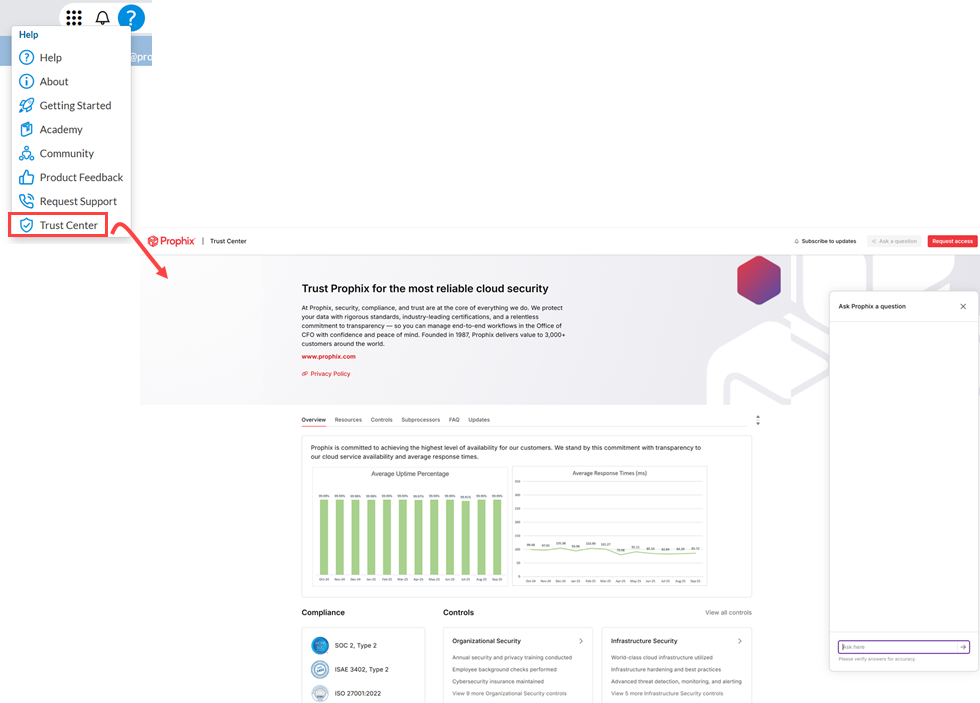
Clients can now access our organization's security, privacy, and compliance information. Click Trust Center in the Help menu to view this information.
Alert to select consolidation period
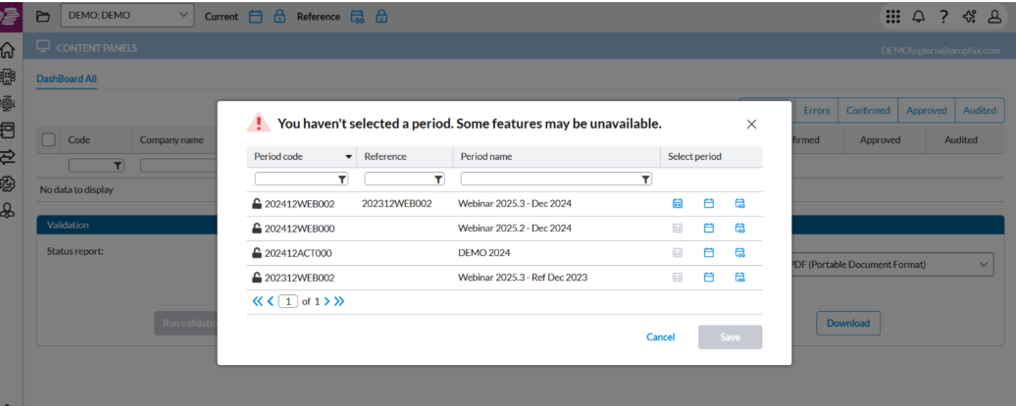
A pop-up alert now appears when no periods are selected, letting users know that some features may be unavailable. Previously, if no periods were selected, certain menus were hidden without explanation. The new alert gives users the option to select the required periods or continue without making a selection. Once dismissed, it will not appear again during the current session.
User Experience and Interface Enhancements
Delivers visual and workflow updates for a clearer, more intuitive experience.
Updated Browser tab and Menu label
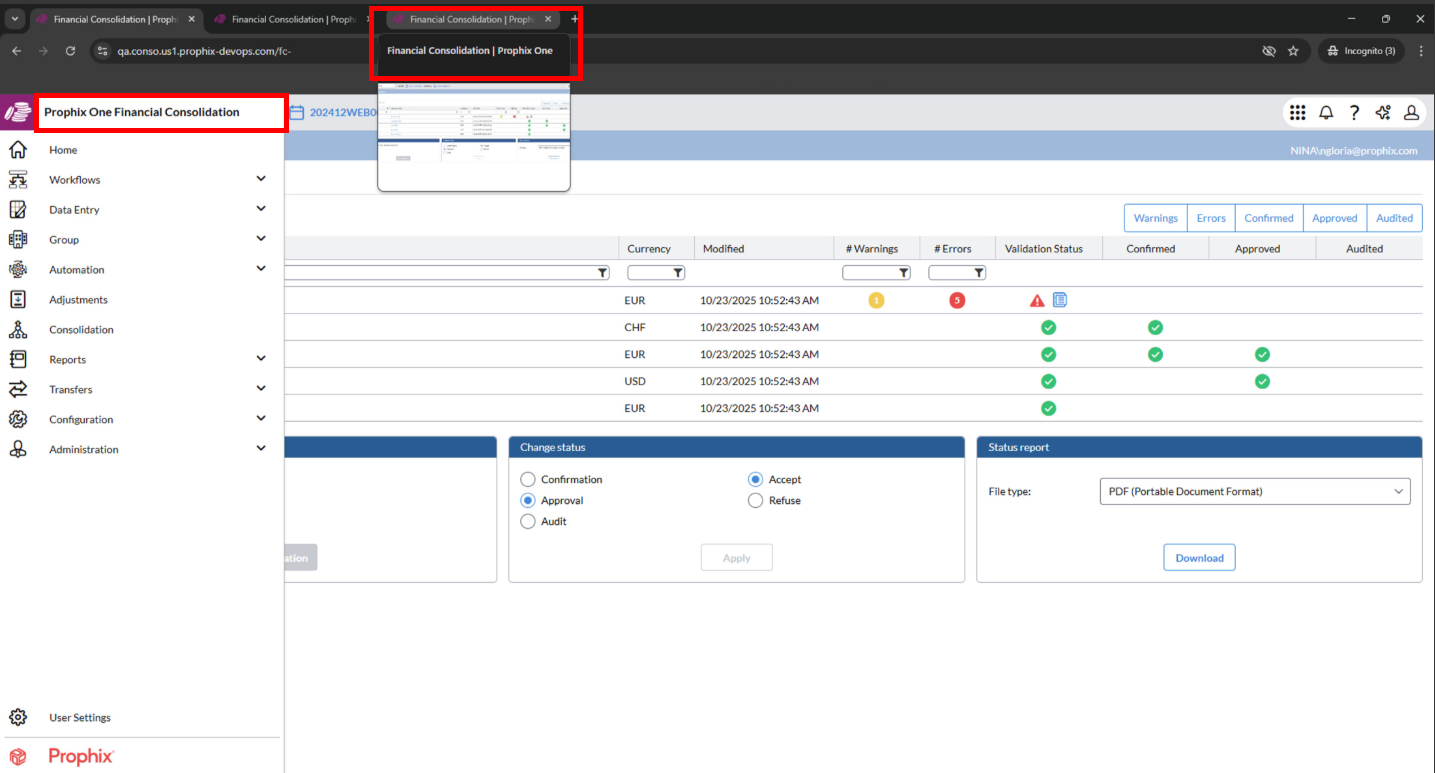
When accessing Financial Consolidation through the Prophix One portal, the browser tab now displays Financial Consolidation | Prophix One.
In the side menu, the label now appears as Prophix One Financial Consolidation.
This update provides consistent Prophix One branding and helps users easily identify the application within the portal.
Consolidation module enhancements
Several usability and design improvements were implemented across the Consolidation menu to streamline navigation and provide a more consistent user experience throughout the module.
Generate Events
-
The message displayed when no data is available has been changed from an error to a warning to reduce confusion for users.
Intercompany Matching
-
Expanded the space for introductory text shown before starting a session.
-
Removed outdated error messages; only relevant consolidation information now appears when a session is restarted.
-
Updated tables to the new design, removing scrollbars for a cleaner layout.
-
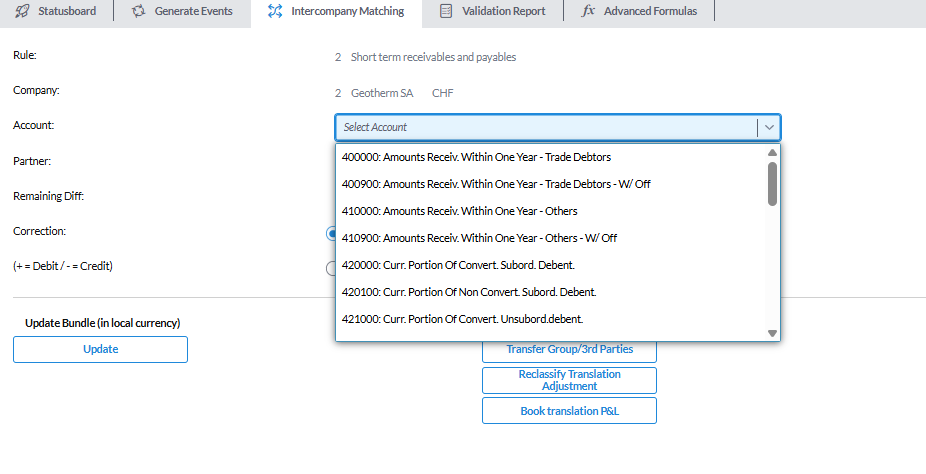
Replaced the Account search field on the Correction screen with a searchable dropdown.
-
Applied the new design to error messages on the Correction screen.
Validation Report
-
Removed notifications for process start and completion, as this information is already visible on the report screen.
-
Standardized the font for process status messages to align with the application’s design.
Adjustments module enhancements
We made the following improvements to make navigation and data review smoother across the Adjustment module:
-
Users can now copy content directly from tables.
-
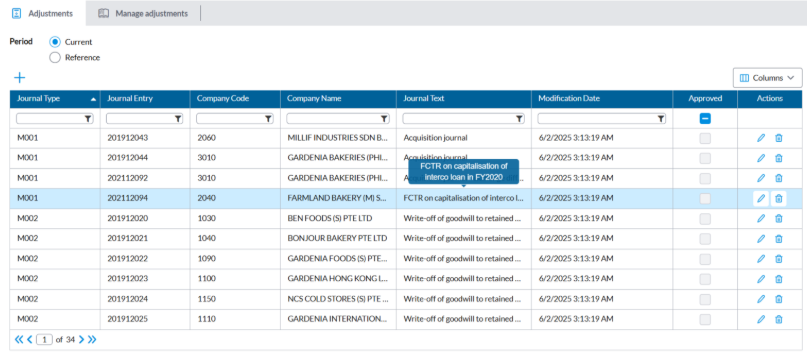
When text is truncated, hover to view the full content in a pop-up.
-
Right-click the
 View icon to open journal details in a new tab.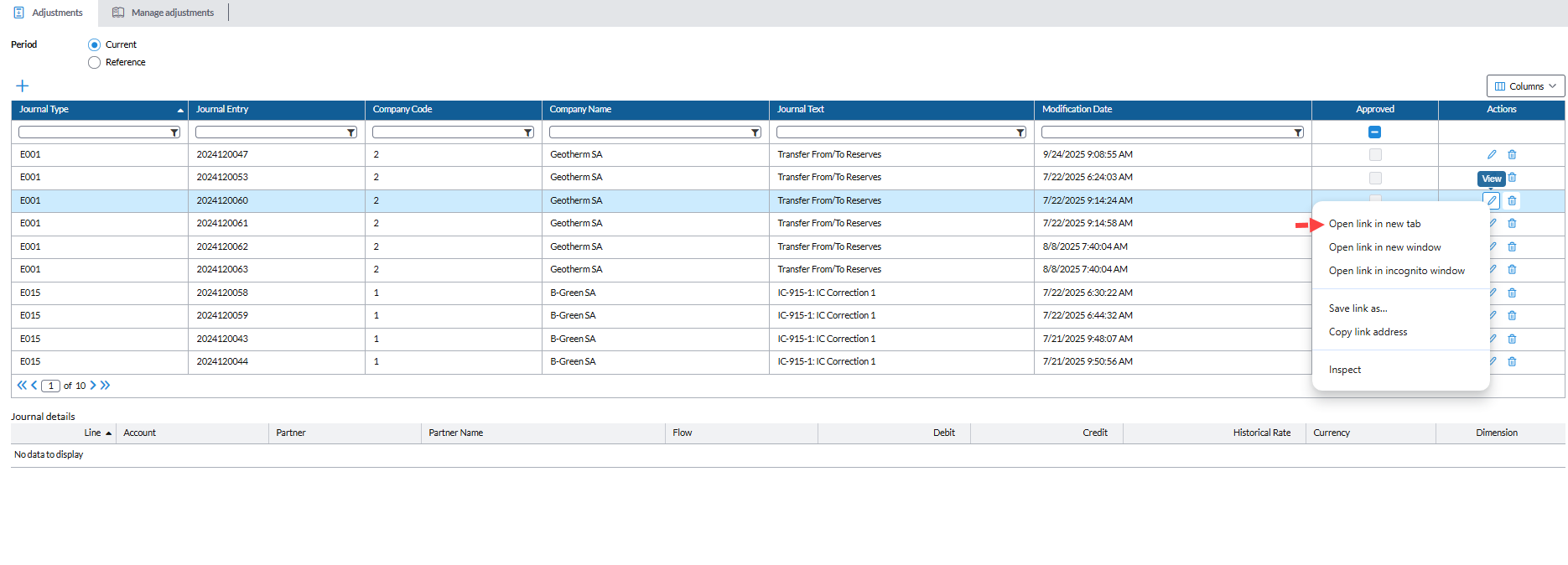
-
The View by Accounts page and action window have been refreshed with the new, modern design.
-
The Journal Text column is now wider for better readability.
Adjustments and Local Adjustments enhancements
We’ve made it easier to view and organize your data in the Adjustments > Adjustments and Data Entry > Local Adjustments modules.
-
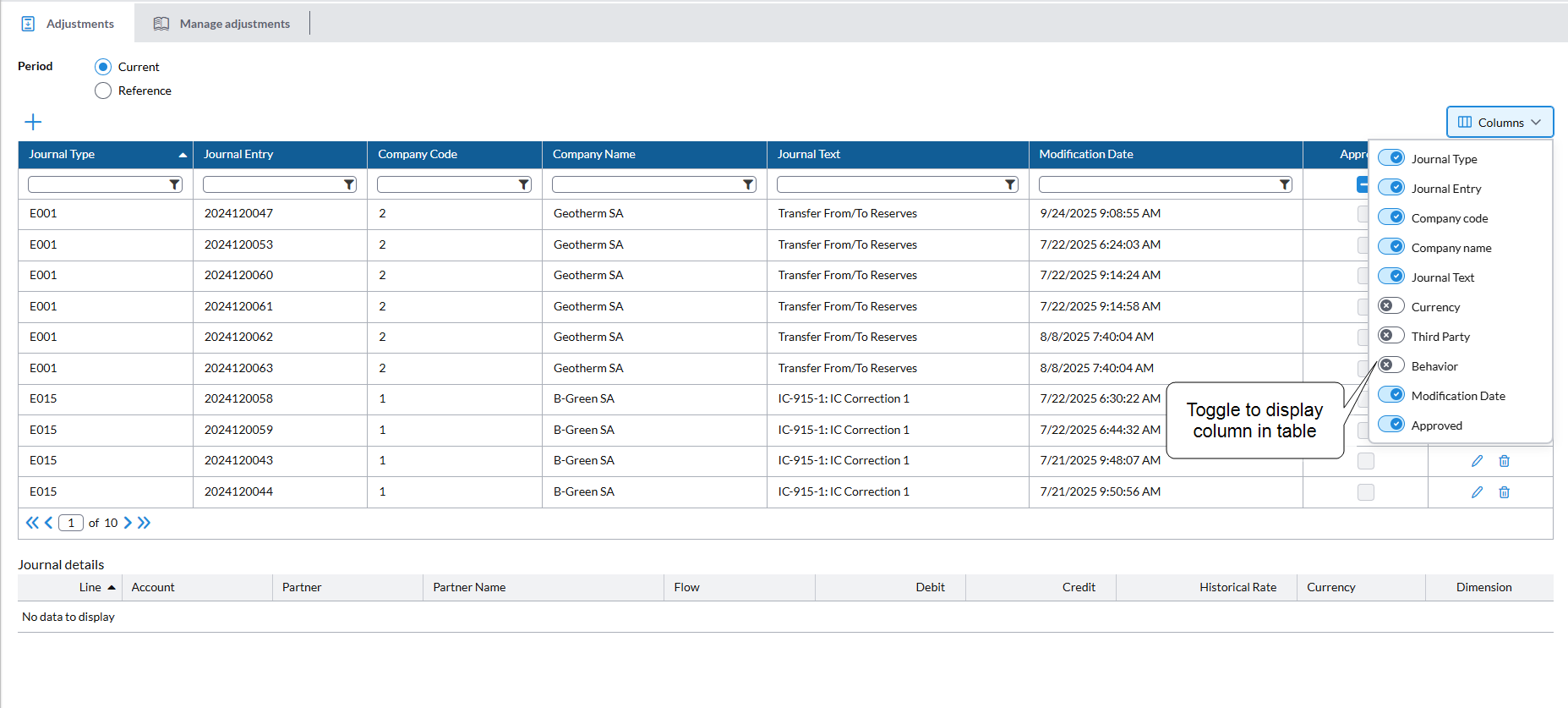
A new Columns filter lets you show or hide selected columns.
-
Key details such as Currency, Third Party, and Behavior, which were previously available only in the details view, can now be viewed directly in the table.
Improved performance in Manage Adjustments
The Manage Adjustments page previously experienced slow load times when opening, as it loaded all journals for the selected journal type. Recent optimizations have improved performance by approximately 75%, resulting in significantly faster load times.
Email Template enhancements
All system emails now follow the new standard template for a consistent look and feel. Previously, some messages used hardcoded templates, but these have been updated to ensure all emails sent by the application use the unified design.
Customer feedback driven enhancements
Improves usability, consistency, and performance for a smoother, more intuitive experience across the application.
Apply source account, flow, or dimensions automatically in Eliminations
-
Added a new Same as source option in the Target field to simplify eliminations setup.
-
This option automatically applies the same account, flow, or dimensions as selected in the Sourcefield, reducing the need for duplicate updates.
-
It also supports reversing all accounts under a summation account.
-
-
The previous Self option for partner selection was renamed to Same as source.
Run a job instantly without changing its schedule
A new  button has been added in Automation > Jobs > Schedules, allowing users to execute a job immediately without modifying its existing schedule. Previously, users had to temporarily adjust and save the schedule to run a job manually. The new button performs the same action as a fixed schedule and is disabled when the job is inactive.
Enable monthly export of cash flow data to Reporting Solutions
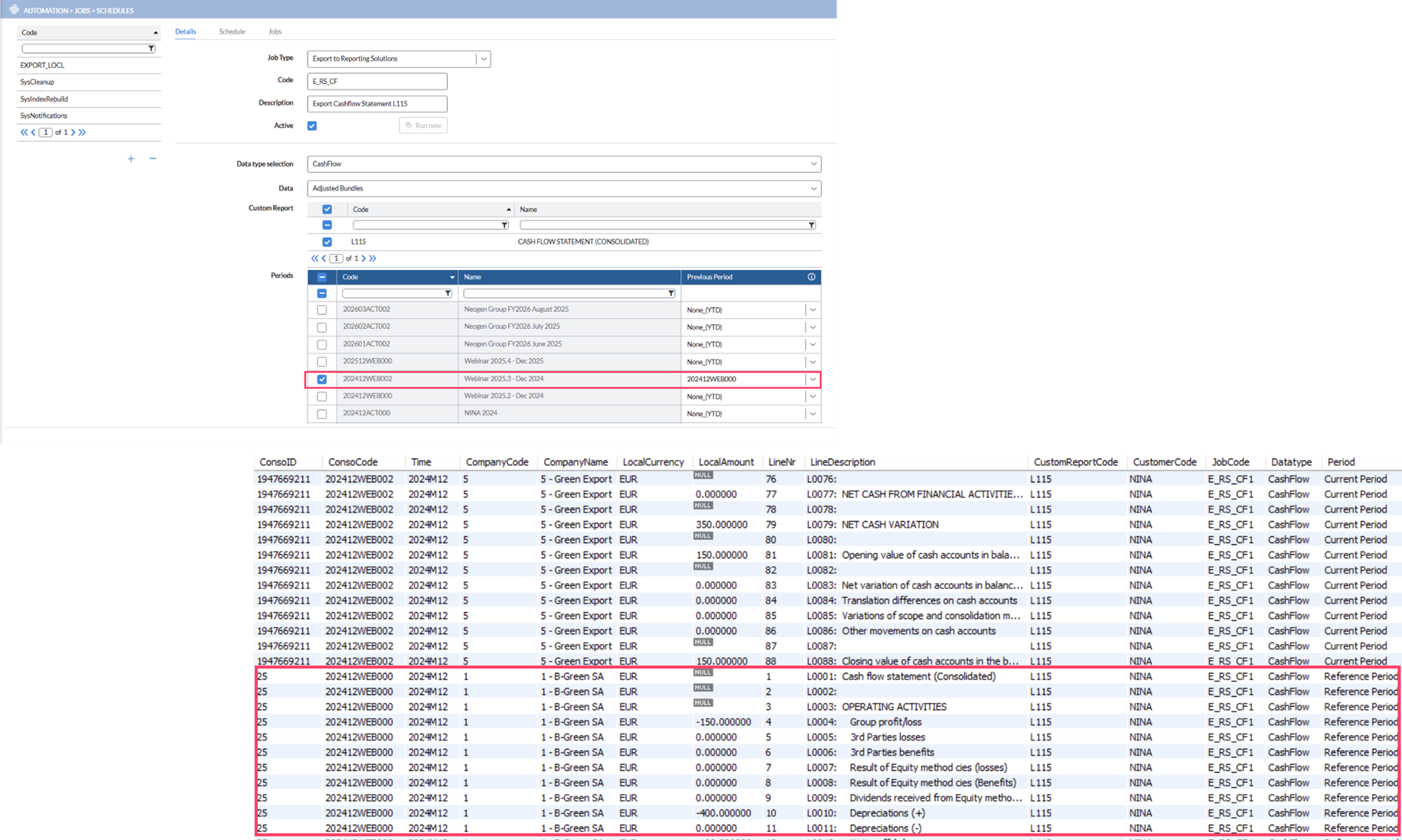
We enhanced the Export to Reporting Solutions job to support monthly exports of cash flow data, including prior-year amounts, in line with FP&A practices.
When the Job Type is set to Export to Reporting Solutions and the Data Type is Cash Flow, a new Previous Period column is now available in the Periods table — similar to consolidated data exports. The selected previous period is exported as Reference Period in the Period column, with all related amounts reversed.
General improvements
Includes performance, reliability, and usability refinements across the application.
Events and Eliminations — Label updates
Labels were updated to align with the naming conventions used throughout the application.
-
In Configuration > System Structures > Events > Create Custom Events, within Event Details (when adding a new line), the panels have been renamed for clarity:
-
From has been changed to Source
-
To has been changed to Target
-
-
In Configuration > System Structures > Consolidation Eliminations, within Elimination Details (when adding a new line), the panels have also been renamed:
-
From has been changed to Source
-
To has been changed to Target
-
Export/Import Adjustments
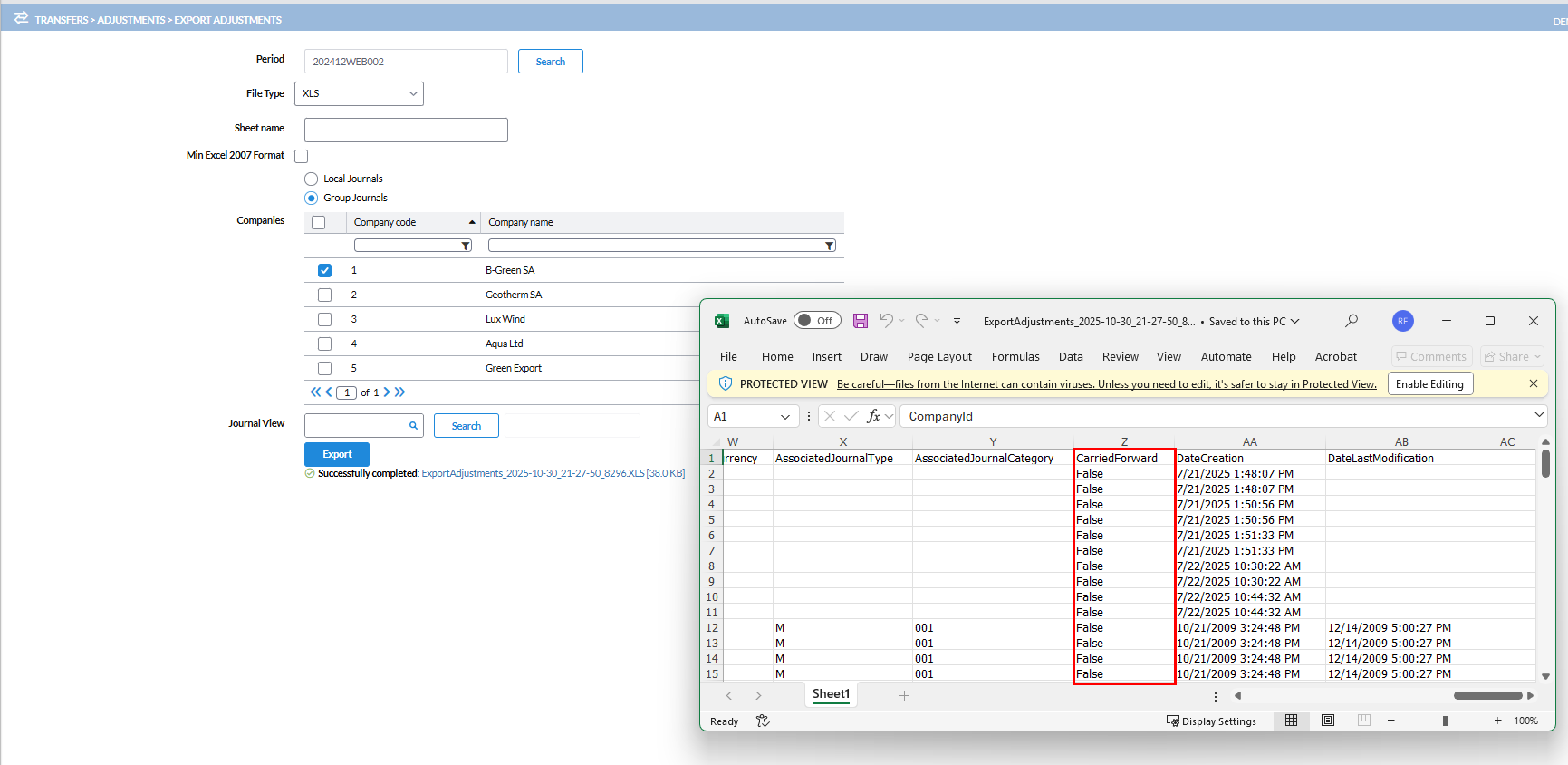
Carried forward information is now handled consistently during the export process to ensure data integrity.
-
In Transfers > Adjustments > Export Adjustments, the exported file (XLS or CSV) now includes a new Carried Forward column showing whether each record is carried forward (TRUE) or not (FALSE).
-
In Transfers > Adjustments > Import Adjustments, the Carried Forward column is ignored during import. The system retains the existing carried forward status, and users cannot modify this value through the import.
Note: If the system configuration Prevent changes on adjustments carried forward is set to TRUE, users cannot import or edit these journals.
Validation to prevent duplicate journal entries in Manage Adjustments enforced
Previously, users could move journals between entities in Manage Adjustments even if a journal entry with the same identifier already existed. This behavior was inconsistent with the validation applied elsewhere, where duplicate journal entries across entities were not allowed.
Now, the same validation logic has been extended to Manage Adjustments. If a user attempts to move a journal to another entity using a journal entry that already exists, the system prevents the action.
Resolved issues
The following are the issues we resolved in this release:
| Released | Ticket Number | Area | Description |
|---|---|---|---|
| November | 173044 | Reports | Non-English characters were not displaying correctly in reports. |
| 194548 | Configuration > System Structures > Bundles > Online Bundles Setup | Copying an input form using the Copy Structure function changed cell properties in the advanced input form. | |
| 195110 | Administration > Security > Reports on Users | Reports on users generated empty pages. | |
| 195407 | Dashboard – Validation Report | Zero values appeared in the validation report. | |
| 196561 | Configuration > System Structures > Bundles > Online Bundles Setup | Indentation did not work in the Online Bundle form. | |
| 196644 |
Dashboard – Status Report Reports > Standard Reports > Consolidation Adjustments |
The Dashboard Status Report showed ‘OK’ status even when the report had not been run. The minimum and maximum entry numbers in the Consolidation Adjustments report were separated by commas. |
|
| 197273, 197053, 201250 | Reports > Standard Reports > Local Bundles | Excel export of reports split into multiple sheets instead of a single sheet per company. | |
| 197347 | Transfers > Structures > Import | An error message appeared when attempting to import custom reports. | |
| 197900 | Configuration > System Structures > Journals > Define Journal | The Associated Journal Type was automatically filled with the earliest journal category when creating a new journal. | |
| 197902 | Configuration > Periods Management > Sub Groups | The Reference Period reverted to the default after selecting Calculate. | |
| 198041 | Administration > Security > Reports on Users | The Period/User/Company report used an incorrect format for the client. | |
| 198916 | Reports > User Reports > Define User Reports / Configuration > System Structures > Bundles > Online Bundles Setup | Indentation and font formatting were not reflected on the Online Bundle Setup page. | |
| 198174, 170179 | Analytical Dimensions | Users were unable to delete dimensions | |
| 199147 | Reports > Analysis Reports > Audit Trail | Expenses were not displayed in the Audit Trail report. | |
| 198372, 199022 | Transfers > Adjustments > Import Adjustments | The Generate Extra Rows option created two extra lines multiple times under Import Adjustments. | |
| 199361 | Transfers > Structures > Import > Mapping Tables | An issue occurred when importing a mapping table using the Add and Replace option. | |
| 199807 | Reports > Analysis Reports > Reports | Pivot reports did not show any data due to applied filters, and amounts were formatted incorrectly. | |
| 199365 | Consolidation > Consolidation > Statusboard | An adjustment transmitted to a subgroup was translated at the main group’s reference closing rate even though it was set to translate at the average current rate. | |
| 200147 | Adjustments > Manage Adjustments | A valid journal could not be imported (copied) from the previous period. | |
| 200233 | Transfers > HUB > Authorization | End users could see imports from companies they did not have access to, while restricted users were unable to see the HUB Authorization even when they had the necessary access. | |
| 200230, 204892 | Configuration > System Structures > Copy Operations | Consolidator users were unable to use the Copy Operations function. | |
| 203315 | Data Entry > Validation Reports > Bundle Validation | The validation rule did not work as expected — rules with dimensions did not show amounts on the left side but displayed them on the right side. | |
| 203817 | Data Entry > Manual Data Entry > Local Amounts > Bundle Data Entry | Reports could not be printed from Data Entry. | |
| 203613 | Data Entry > Manual Data Entry > Local Amounts | The Intercompany button was highlighted even when there was no amount in Total 3rd Parties. | |
| 203931 | Configuration > System Structures > Accounts > Summation Accounts | Adding rows in Summation Accounts did not work when attempting to add an account or summation account. | |
| 203921, 205239, 204714 | Data Entry > Manual Data Entry > Local Adjustments / Adjustments > Adjustments | The Clear and Undo Changes functions did not work. | |
| 202591 | Automation > Jobs > Schedules – Export to Reporting Solutions | Export to staging failed for period “202506IND001” with the error “Source data is empty.” | |
| 204669 | Consolidation | Incorrect FX translation occurred for specific cost center combinations in Korea. | |
| 204715 | Configuration > System Structures > Journals > Define Journal | The associated journal type did not update automatically upon creation of a new defined journal. | |
| 205165 | Automation > Jobs > Schedules | Cleanup and import jobs failed with a severe error. | |
| 203536 | Reports > Consolidation reports > Consolidation Reports - Entity | Bundle amount not translated/calculated correctly for Translation adjustments analysis report . |