License management
The License management page presents an overview of your application including:
-
License details including version, expiration date, maximum number of companies
-
Maximum number of users allowed with your license
-
Path to your shared directory
-
An avenue for administrators to update the license.
To access the License management page, click Administration > License management.
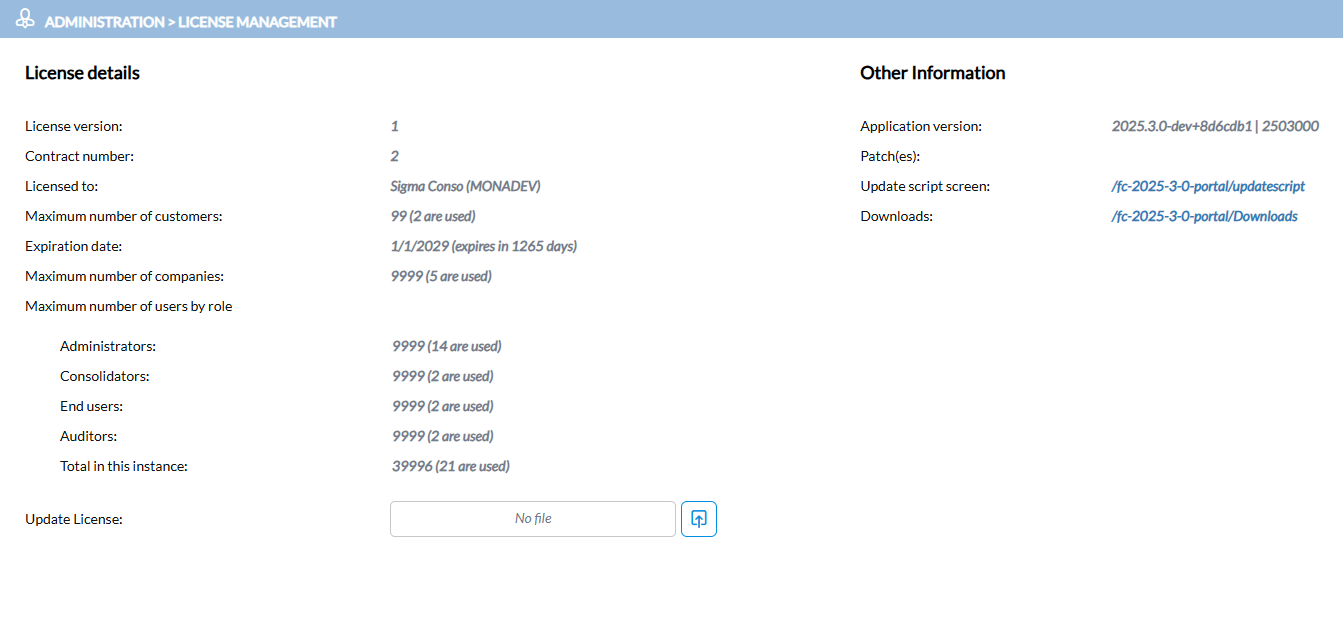
License Count
The license counts appear under Maximum number of users by role.
Financial Consolidation (FC) counts licenses by role. When your instance has more than one customer, FC looks at each role separately and uses the highest number found in any single customer. It does not add the roles across customers.
For example, three customers have these Administrators:
| Customer | Administrators |
|---|---|
| Customer A | 4 |
| Customer B | 3 |
| Customer C | 1 |
FC counts 4 Administrators, because Customer A has the highest number.
License Limits and Usage
Licenses are grouped into two buckets: Platform Managers and Platform Users.
For each, the page shows:
-
Limit: the sum of the limits for each role in the bucket.
-
Used: the sum of the licenses used by each role in the bucket.
-
The Total row shows the combined limit and sum of active users for both buckets.
Platform Managers
This bucket consists of Administrator and Consolidator roles.
Limit: the Administrators max limit from the license plus the Consolidators max limit from the license.
Used: the highest number of Administrators in a single customer plus the highest number of Consolidators in a single customer.
Platform Users
This bucket consist of End user and Auditor roles.
Limit: the End users max limit from the license plus the Auditors max limit from the license.
Used: the highest number of End users in a single customer plus the highest number of Auditors in a single customer.
Note: The highest number for each role may come from different customers.
Change user roles
You can change a user’s role to another role in the same bucket without using an additional license. For example, changing a user from End User to Auditor does not change the Platform Users count.
Update the license
-
If you are logged in as an administrator, the Update License field is enabled. Use
 to browse to the saved license file and update it.
-
If you are logged in as a customer-independent administrator, the Update script screen link is enabled. Use it to download and apply the update files provided by Prophix.
 See also