Manage group adjustments
The Manage Adjustments page allows you to make necessary adjustments to group journal entries during a consolidation period.
To access the Manage Adjustments page, click  Adjustments > Manage Adjustments.
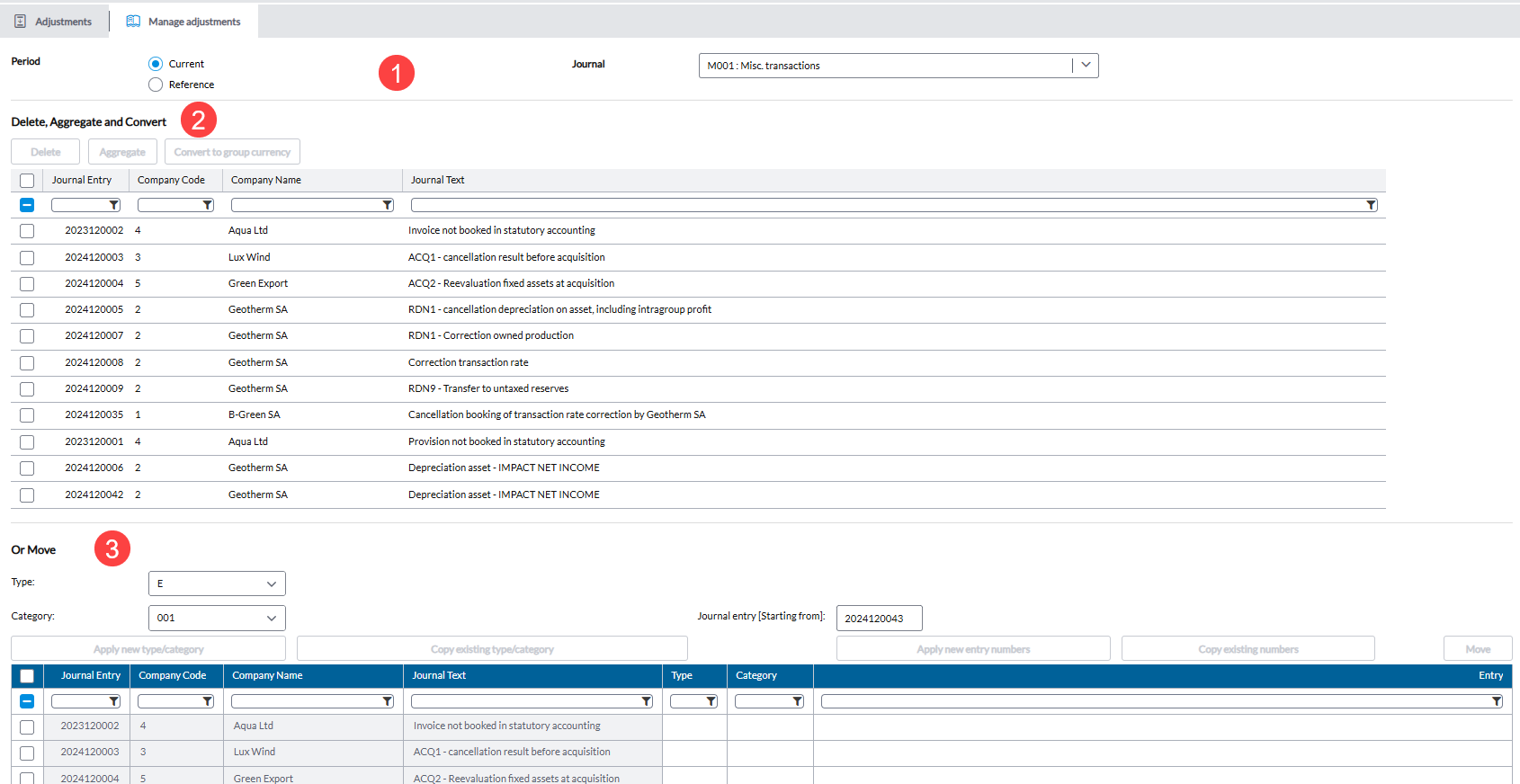
The Manage Adjustments page opens by default in the Current period and it is divided into sections:
Current Period view
-
Section 1: For selecting the period and journal you want to work with.
- Period - Select an option to display adjustments from either the Current or Reference consolidation period.
-
Journal - Select a journal type
-
Section 2: To Move journals
This section is used to move journals based on user-specified target values:
-
You can apply or copy suggested values for journal type and /or journal entry directly into the table.
-
After clicking
 , selected journals are transferred according to the entered options.
-
-
Section 3: For common journal actions (Delete, Aggregate, and Convert)
Use this section to apply one of the following actions to checked journals. All actions in this section share the same selection and validation requirements:
-
 – Removes all checked journals.
 -
 – Aggregates details from all checked journals into the first selected journal. Source journals will remain but will be emptied.
 -
 – Converts amounts in the checked journals from local currency to group currency.
-
Reference Period view
When the Reference period is selected, the following sections are available:
-
 - Copies a selected journal from the reference period to the current period.
 -
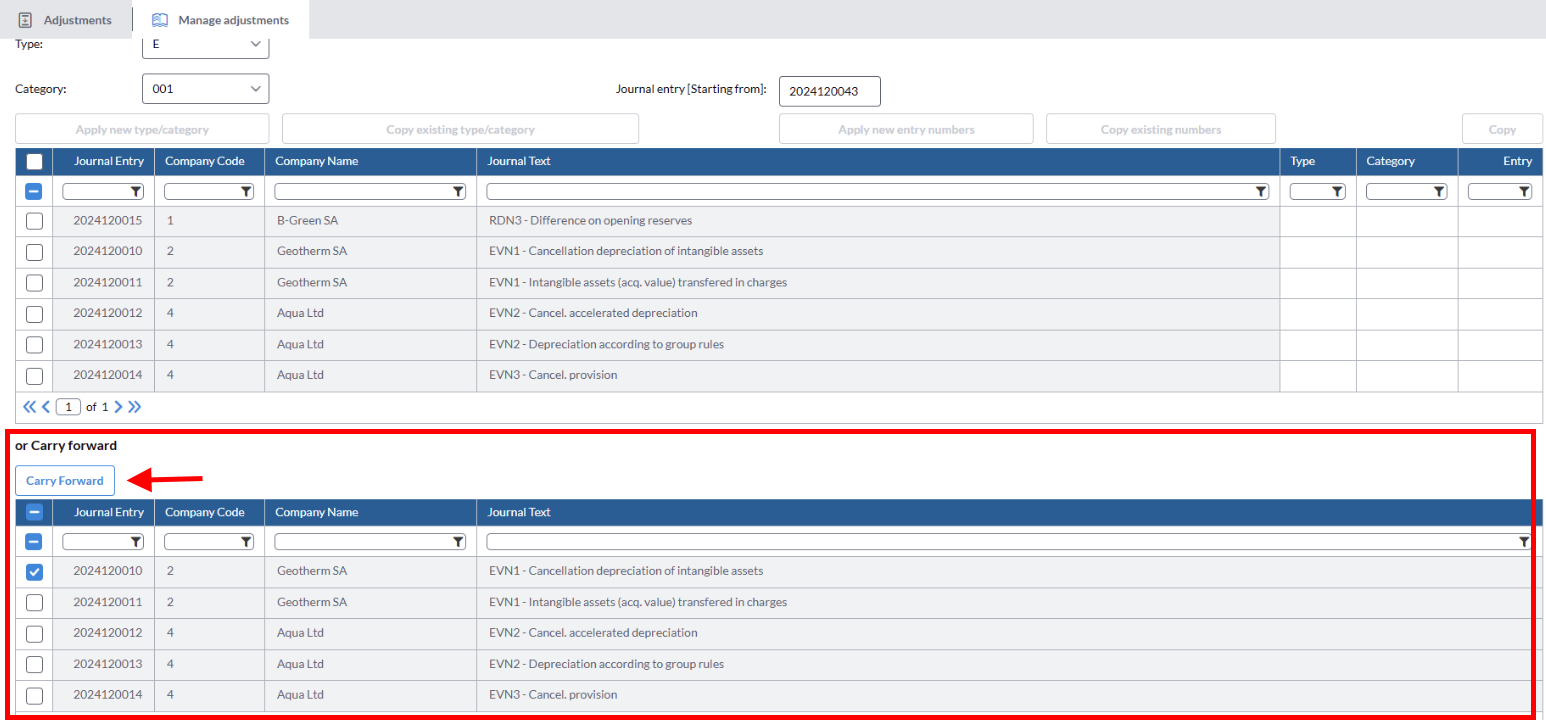
Or Carry Forward - Allows you to use the
 button to forward a selected journal from the reference period to the current period.
Move a group adjustment from one journal to another
-
Select a Period and theJournal you want to move adjustments from
-
In the Move section, select the destination Journal.
-
Optionally, in the Journal entry (Starting from) field, enter the starting adjustment number:
Apply New Entry Numbers — assigns new numbers to the moved adjustments.
Copy Existing Numbers — keeps the original adjustment numbers.
-
From the list, select the adjustments you want to move.
- Click
 . To keep the current journal type, click
 .
. -
Click
to transfer the selected adjustments to the destination journal.
Aggregate
Using the button, you can combine all the entries for each company into a single journal entry. This can be extremely useful for customers with extensive histories.
In the application all entries are retained over time so customers can see a comprehensive list of journal entries for all consolidations dating back to the initial use. However, as the list grows, some customers may wish to condense multiple journal entries and that is precisely what the function accomplishes.
Convert to group currency
The button is used to convert the journal entry that was made in a local currency to the group currency. For example, if the group currency is USD and the journal entry was made in CAD, click to convert the journal entry from Canadian dollars (local currency) to US Dollars (group currency).
Copy journals from reference period to current period
-
In Manage Adjustments, change the period to Reference.
-
In the Journal drop-down field, select the journal you want to copy.
-
In the Copysection, select another Journal to copy the adjustments to.
-
Optionally, in the Journal entry (Starting from) field, enter the starting adjustment number:
-
Apply New Entry Numbers — assigns new numbers to the copied adjustments.
-
Copy Existing Numbers — keeps the original adjustment numbers.
-
-
Select the journal entry you want to copy
-
Enter or select the required Type and Category for the selected journals.
-
Click
.
Carry forward a journal from reference to current period
In some cases, you may need to correct or reuse a specific journal without recreating the entire period. You can manually carry forward an individual journal from a reference period to the current period.
To carry forward a journal:
-
On the Manage Adjustments page, select Reference period and choose the appropriate reference period.
-
From the Journal drop-down, select a journal.
-
Go to the or Carry forward section.
-
Select the journal to carry forward.
-
Click
. The selected journal is carried forward to the current period using the same logic applied when a new period is created.
Eligible journals
Only journals with one of the following settings can be carried forward:
-
Copy
-
Carry forward to reserve
-
Carry forward – Keep P&L
-
Reverse